


Aydınlatma metni yükleniyor…
Not every website change needs a separate test environment. Copy updates, image replacements and low-risk style adjustments with a clearly limited impact can be made carefully on the live site. Software updates, payment systems, forms, account functions, database changes and extensive design work should be tested without affecting live users first.
The right decision is not based only on how small the change appears. Its effect on user journeys, data, connected services and the rollback method all matter. This guide provides a practical framework for classifying planned work as a controlled live edit, a change that needs test-environment validation, or a separate development scope.
What Are Live and Test Environments For?
The live, or production, environment is the published system used for real visits and transactions. A defect here can directly affect form submissions, order records, user accounts, page presentation or third-party connections.
A test environment is a separate workspace where a planned change can be reviewed without exposing live users or production data to the same risk. Teams can use it to test designs, functions, user roles, forms, payments and integrations. The client can also review the proposed release before it reaches the public site.
A test environment is not necessarily an exact copy of production. Domains, server configuration, caching, email services, payment settings, access permissions and traffic conditions may differ. A change that works in testing therefore still needs a short production check after release.
The OWASP Web Security Testing Guide treats testing as a process that can extend through development, deployment, maintenance and operations. It also describes verifying a change again after it has been approved and tested in QA and deployed to production.
Which Changes Should Be Made in Which Environment?
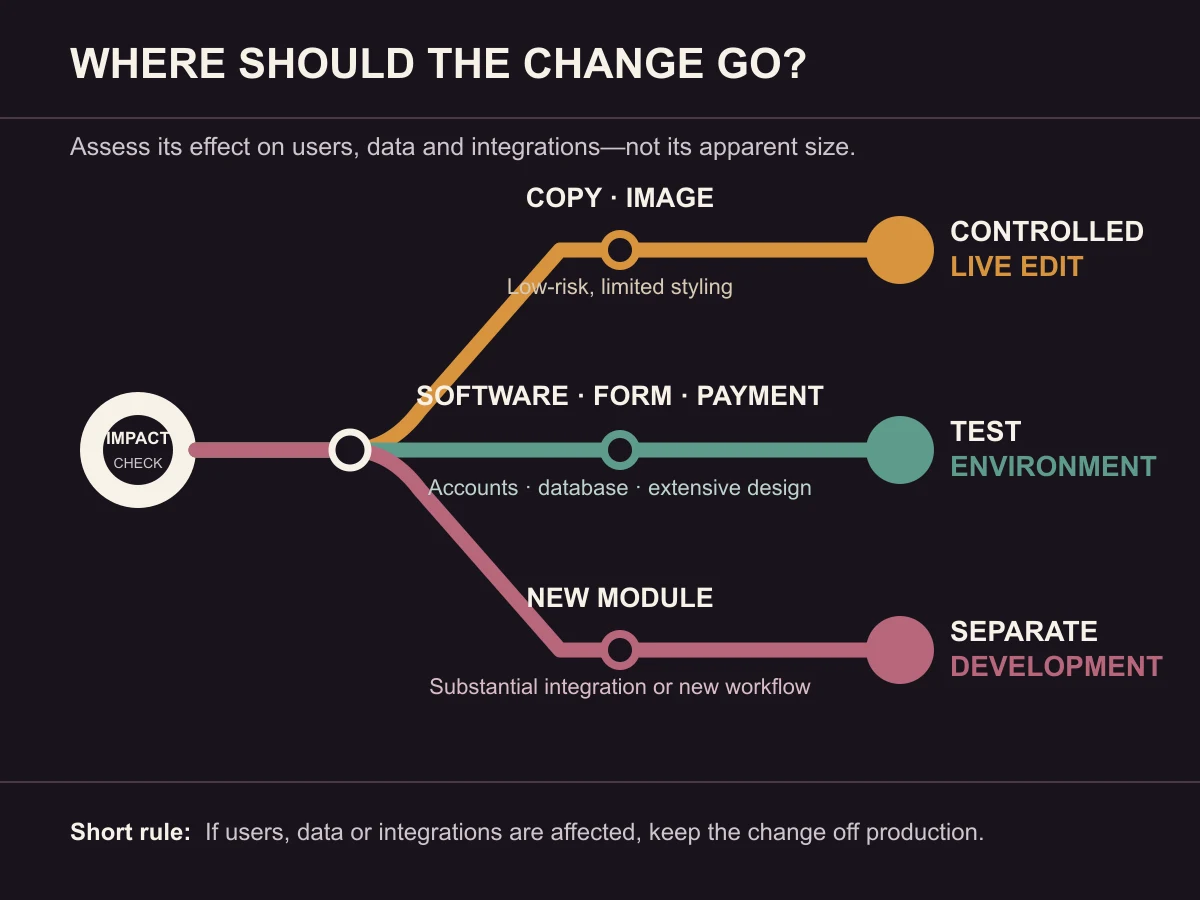
The following matrix provides a starting point. The final approach should reflect the website architecture, scope of the change, possible data impact and available rollback method.
| Change type | Starting decision | Why? | Minimum check |
|---|---|---|---|
| Typo, short copy or contact-detail update | May be a controlled live edit | The impact is usually limited to one content field | Preview, links and both language versions |
| Image replacement | May be a controlled live edit | It may not affect functionality, but dimensions and cropping can break presentation | Desktop/mobile crop, file size and alt text |
| Low-risk style adjustment | May be a controlled live edit | It can be limited to a specific component | Target page, mobile view and adjacent components |
| Template or extensive design change | Test environment | It may affect many pages and viewport sizes | Representative pages, mobile/tablet, forms and navigation |
| Software or dependency update | Test environment | It can introduce unexpected compatibility or functional problems | Critical journeys, error records and integrations |
| Form or email-flow change | Test environment | A success message can appear even when delivery fails | Submission, delivery, logs and failure states |
| Payment or account function | Test environment | Orders, sessions, permissions and records can all be affected | Successful/failed transactions, records and notifications |
| Database, role or permission change | Test environment with rollback planning | Data integrity and access boundaries may be affected | Backup, sample data, role scenarios and rollback |
| New module or substantial integration | Separate development and testing | This is a new functional scope rather than a small edit | Requirements, scenarios, acceptance criteria and release plan |
“May be a controlled live edit” does not mean “needs no checking”. A low-risk copy change can still be applied to the wrong locale, break a link or cause text to overflow on a narrow screen.
How Do You Assess the Real Risk of a Small Change?
A change may involve only a few lines and still have a wide impact. Answer these five questions before selecting the environment:
- How many pages or components can it affect? A small edit to a shared template may appear across the entire site.
- Does the user complete a task? Forms, payments, account access, search and file uploads increase the need for controlled testing.
- Does it change data? Database structure, user records, orders or permissions require more careful rollback planning.
- Does it depend on another service? Email, CRM, payment, mapping and API connections have settings and failure states on both sides.
- Is it easy to reverse? Reverting one known content value may be simple. Restoring a process that transformed data may require more than deploying an older file.
If any answer is unclear, moving the change to a test environment is usually the more controlled choice.
The Change Process Should Fit the Project
Websites do not all share the same architecture or risk profile. The NIST Secure Software Development Framework presents high-level secure development practices that can be integrated into existing software development life cycles. This supports adapting the process to project requirements instead of treating one tool or environment name as sufficient by itself.
Kumsal Ajans uses separate test environments for corporate websites, e-commerce, custom software and projects involving integrations. Copy, image and low-risk style updates may be made on the live site when their impact is controlled. The purpose is not to turn every small edit into a heavy release process, but to separate changes that can affect users, data or business workflows from the production system.
The same distinction applies to a project-specific content management platform. An editor changing copy on one page does not belong in the same risk category as software work that changes a form, user role or integration.
How Does a Controlled Release Process Work?
Kumsal Ajans's confirmed practices can be expressed as the following release flow.
1. Define the change and its impact
Identify the pages, user roles, data and integrations that may be affected. If the scope is unclear, the test scenarios will be incomplete as well.
2. Select the appropriate environment
Low-risk content and limited style adjustments may be handled as controlled live edits. Software, payment, form, account, database and substantial design changes are moved to a test environment. A new module or workflow may need its own development scope.
3. Test critical scenarios
Opening the edited screen is not enough. Check the relevant user journey from start to finish. For a payment change, this can include the session, order record, status update and required notifications—not only the payment screen.
4. Separate technical review from client approval
The Kumsal Ajans team completes the technical checks. The authorised client representative provides final release approval. This separates “the function works as tested” from “the change meets the business need and is approved for publication”.
5. Prepare backups and the rollback approach
File and database backups are taken before production deployment. When the nature of the change requires it, the method for returning to a previous release or suitable backup is prepared. Having a backup is not, on its own, a rollback plan: the team must also know which components would be restored, in what order and under which conditions.
6. Release and verify again in production
The approved change is deployed to the live environment. The related critical journeys are then tested again rather than checking only that a page opens. Configuration differences between testing and production may become visible only at this stage.
How Should a Test Environment Be Protected from Visitors and Search Engines?
Test environments may contain unfinished copy, sample data or functions that have not yet been approved. Access control and search indexing therefore need to be handled as separate concerns.
Depending on the project, Kumsal Ajans uses password-protected access, IP restrictions and search-engine indexing controls. Google Search Central explains password protection for content that should be accessible only to authorised users and the noindex rule for an accessible page that should not appear in Google Search results.
Those measures do not do the same job. noindex does not prevent a person from accessing the page; it instructs search engines not to show the page in results. A password or another authorisation mechanism restricts access to the content. Blocking crawling in robots.txt should not be treated as a guaranteed indexing block by itself.
The selected protection should reflect the information in the environment and who needs access. Copying real personal or commercial data into a test environment without appropriate controls should not be treated as a routine testing step.
Which Checks Should Be Repeated After Release?
Depending on the scope of the change, Kumsal Ajans rechecks:
- Form submission and required notifications
- Mobile presentation and basic responsive behaviour
- Page and in-page links
- Project-specific integrations
- Speed behaviour of the affected page or journey
- SSL access and secure connections
- Baseline technical SEO elements
A baseline SEO check may include looking for an unexpected change to the page title, indexing rule, canonical, language relationship or access status. It is not a ranking guarantee. A speed review does not promise a fixed score either; it helps identify an obvious regression introduced by the release.
The size of the check should match the impact. Replacing one image may not require a complete payment test. A shared template, software release or server configuration change needs a broader sample.
An Anonymised Real Example: Why Did an Order Fail to Appear in Production?
In one Kumsal Ajans project, the payment journey appeared successful in the test environment. In production, however, a difference in session settings prevented the order record from being created. The issue was identified during the pre-release production check and the relevant configuration was corrected.
The example illustrates two limits. First, a successful test does not prove that all production configuration is identical. Second, validating the journey should not stop when the payment provider returns a successful response; the team should also confirm that the order exists in the application and that the next business steps can continue.
The client, sector and service details have been intentionally omitted. The example is not intended to suggest that a particular platform is unreliable. It shows why production verification remains necessary after test-environment approval.
A Short Pre-Release Decision and Control Record
Use the following fields before releasing a change:
| Control | Question to answer |
|---|---|
| Change definition | What exactly is changing? |
| Impact area | Which page, role, data or integration may be affected? |
| Environment decision | Controlled live edit, test environment or separate development? |
| Test scenarios | Which successful and failed journeys will be tested? |
| Technical owner | Who completes the technical review? |
| Client approval | Who authorises the final release? |
| Backup | Which file and database backups were taken? |
| Rollback | How would the team return to a previous release or backup? |
| Production verification | Which tasks will be repeated immediately after release? |
| Record | Where will results and discovered issues be documented? |
This record does not have to be the same length for every project. Its purpose is to make the impact visible and connect technical checks with approval.
Conclusion: Assess the Impact, Not Just the Size
The correct environment for a website change depends on more than the number of minutes or lines of code involved. If the work affects a user transaction, data, an integration, a shared template or the rollback method, it should be handled in a test environment. A change limited to one content field and easy to reverse may be suitable for a controlled live edit.
Kumsal Ajans plans testing, technical review, client approval, backups and production verification according to the scope of corporate website, e-commerce, custom software and integration projects. To discuss the appropriate environment and control level for a planned change, review our web software service.
For broader launch and acceptance checks, use the corporate website handover checklist. For post-launch responsibility boundaries, see the guide to free support and ongoing maintenance.
Frequently Asked Questions
Does every website need a separate test environment?
Not every individual edit needs the same environment. Kumsal Ajans uses separate test environments for corporate websites, e-commerce, custom software and projects involving integrations. A single copy or low-risk image update may be made on the live site after its impact has been checked.
Why can a change work in testing but fail in production?
Domains, server configuration, caching, sessions, email, payment and access settings may differ. A valid test result remains important, but the related critical journey should be checked again after the production release.
Does noindex fully protect a test environment?
No. noindex is an indexing directive for an accessible page; it does not prevent people from opening the URL. A private test environment may also need password protection, IP restrictions or another authorisation method.
Is taking a backup enough before release?
A backup is important, but it is not a complete rollback plan. The project should define when rollback would be triggered, which files and data would be restored, the required order, and how transactions created between deployment and rollback would be handled.
Who should approve a production release?
In the Kumsal Ajans process, the team completes the technical checks and an authorised client representative provides final release approval. This separates technical verification from business acceptance.