


Aydınlatma metni yükleniyor…
A contact form appearing on the page and displaying a “message sent” notice does not, by itself, confirm that the enquiry reached the intended person or system. The browser may behave correctly while a later step fails silently: the database write, email delivery, CRM hand-off, or webhook processing.
Form testing should therefore cover more than clicking the submit button. The complete path needs to be checked, from field entry and server-side processing to delivery in the mailbox, CRM, or connected service. For business-critical forms, the test date, controlled test data, result, owner, and any corrective action should also be recorded.
Start with an Inventory of Business-Critical Forms
Begin by listing every form that can create an enquiry, application, registration, or other business action. Do not limit the inventory to the main contact page. It may include:
- Contact forms
- Quotation or project enquiry forms
- Job application forms
- Membership, partner, or account registration forms
- Product and service information requests
- Appointment and reservation forms
- Applications that include file uploads
- Newsletter and event registration forms
For each item, record the page URL, purpose, expected recipient, connected CRM or webhook where applicable, and business owner. This turns a collection of forms known only to individual team members into a testable operational register.
Not every form carries the same priority. A quotation form that supports the sales process may be treated as more critical than a general feedback form. Priority should still be based on the form’s role, expected use, data involved, integrations, and operational impact—not merely its label.
Why a Success Message Is Not Proof of Delivery
After submission, a user normally receives a success message, a field-level validation warning, or a general error notice. This feedback matters. The W3C Web Accessibility Initiative guidance on form notifications recommends clearly telling users whether submission succeeded and explaining errors in a way that helps them correct the problem.
The visible notification is only one part of the transaction, however. A form can show a success state while a later operation fails. For example:
- The application may fail to write the record to its database.
- The email service may reject the message or use an outdated recipient address.
- The message may be quarantined or classified as spam.
- A CRM connection may fail because of permissions, field mapping, or an API change.
- A webhook endpoint may respond but fail to process the supplied data.
- An attachment may exceed a file-size, format, or storage limit.
- A recipient may change while the website continues using the old configuration.
“The success message appeared” and “the enquiry reached its destination” are therefore two separate test results. A reliable monitoring record should capture both.
A Seven-Stage End-to-End Form Test
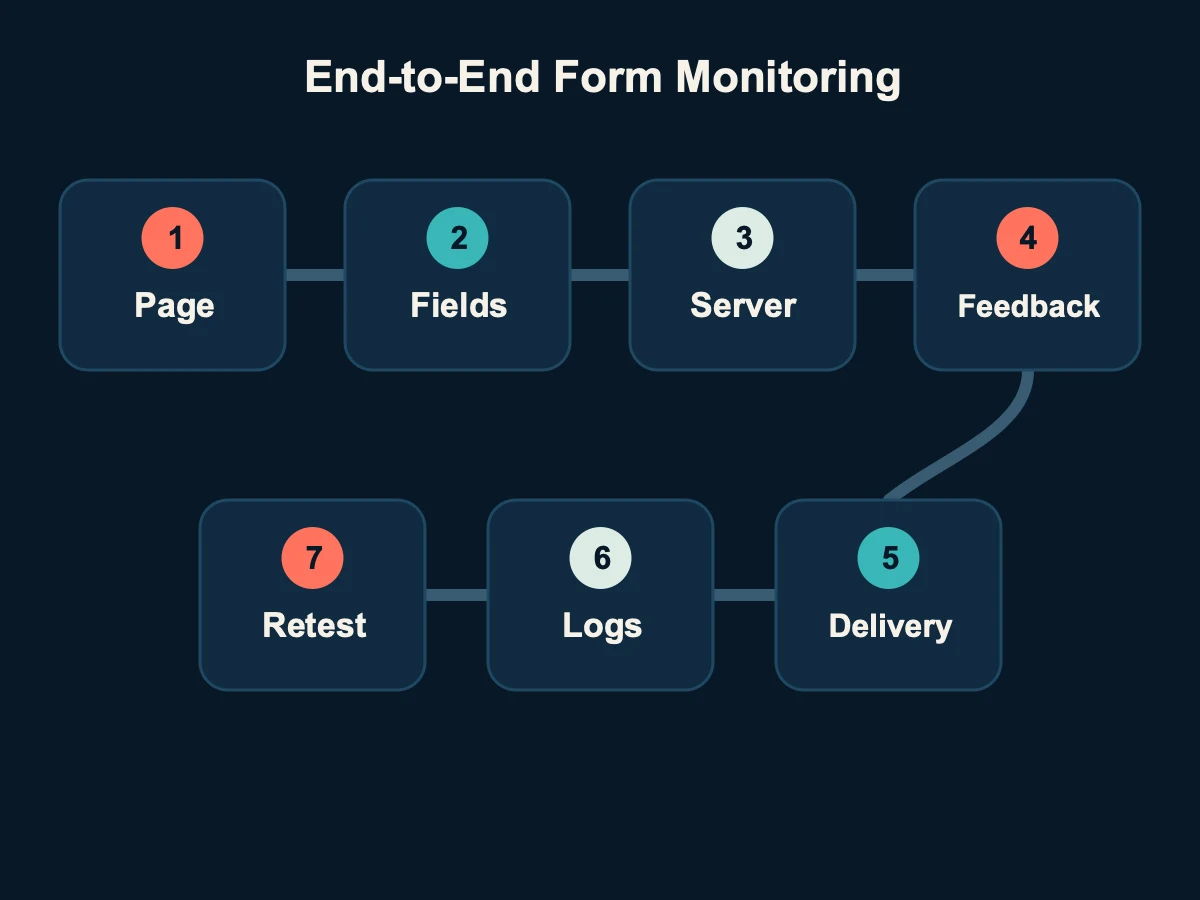
The following matrix provides a common method for checking forms with different technical implementations.
| Test stage | Question | Result to record |
|---|---|---|
| 1. Page and presentation | Does the form open and remain usable on supported desktop and mobile layouts? | Page, device, and browser |
| 2. Field validation | Are required, invalid, and boundary values handled correctly? | Scenario and visible feedback |
| 3. Server processing | Does the server accept and process a valid submission? | Request result and related event |
| 4. User notification | Is the success or error message accurate and understandable? | Message and resulting page state |
| 5. Destination delivery | Does the email, CRM record, or webhook transaction actually arrive? | Record in the destination system |
| 6. Logs and traceability | Can a successful or failed test be located when needed? | Time, test identifier, and outcome |
| 7. Retest | Does the same scenario pass after corrective work? | Post-change verification result |
1. Check the Page and Form Behaviour
Opening the form on one office computer is not enough. Check that fields, selectors, upload controls, consent options, and the submit button can be used in the current desktop and mobile environments supported by the project. Keyboard access, understandable field labels, and discoverable error feedback are also part of a usable form.
This stage should identify visual or interaction failures before they are confused with server or integration problems. Record the page and environment used so another person can repeat the same test.
2. Test Valid and Invalid Input Separately
Try empty required fields, an invalid email format, unusually long text, an omitted consent option, or an unsupported attachment. The W3C guidance on validating form input explains that client-side validation can help people avoid mistakes, while data still needs server-side validation for security.
The test is not complete merely because invalid input is blocked. A user should be able to identify which field needs attention and how to correct it. Valid submissions should not be rejected by an overly restrictive rule.
3. Verify Server-Side Processing
Confirm that the request reaches the server and starts the expected workflow. Depending on the project, this may involve creating a database record, placing a notification in a queue, storing an attachment, or calling an external service.
An HTTP response alone may not prove that every step finished. A multi-stage workflow can complete its first operation and fail at a later one. A timestamp and a distinctive test identifier make it easier to connect the browser action with server events and the destination record.
4. Check the Message Shown to the User
The result shown after submission should be unambiguous. A blank page, a disappearing notice, or an exposed technical error can lead users to submit the same enquiry repeatedly. If an operation fails, the message should explain the next available action without revealing sensitive implementation details.
The user-facing status must also agree with the real processing outcome. Displaying success after a server or integration failure is a common pattern in silent form incidents.
5. Confirm Email, CRM, and Webhook Delivery
Check every destination that belongs to the approved workflow. If the form sends email, locate the test message in the correct recipient mailbox. If it creates a CRM entry, confirm that the record exists with the expected field mapping, source, and assignment. If it calls a webhook, verify that the destination processed the request rather than merely receiving a connection.
Not every project uses all three channels. The test matrix should include only the destinations that actually form part of the website’s architecture and agreed scope.
6. Match the Test Identifier with Application Logs
Within the agreed maintenance scope, Kumsal Ajans follows form errors and failed submissions through server logs where the project provides the necessary logging. The OWASP Logging Cheat Sheet recommends application-level records for events such as application errors, connectivity failures, and third-party service errors. It also describes using an interaction identifier to associate events that belong to one user action.
A distinctive test value that contains no real personal data helps with this correlation. A controlled note can include the form name, date, and test identifier. The same value can then be located in the relevant email, CRM entry, webhook event, and permitted log record.
Logging does not mean storing complete form contents indefinitely. OWASP also advises against recording credentials, access tokens, data of an inappropriate sensitivity level, and personal information that is not needed. Access, retention, and masking rules should be defined according to the project’s security and data-protection requirements.
7. Repeat the Entire Path After a Fix
Saving a configuration change does not confirm that the incident has been resolved. Run the same controlled scenario again and verify every step, from the user notification to the final destination. Check whether the change introduced a problem elsewhere in the chain, rather than testing only the component that originally failed.
The final record should say whether the retest passed, failed, or remains pending. It should also identify the person or team responsible for any remaining action.
How to Keep Test Enquiries Separate from Real Enquiries
If a test entry enters the sales or operations workflow as a genuine lead, the monitoring process creates its own confusion. Use a documented test convention:
- Put an explicit test label in the name, company, or message field.
- Include the date, form name, and a short test identifier.
- Use a project test email address where one is available.
- Apply a test tag or dedicated status in the CRM when supported.
- Decide whether completed test records should be deleted or archived.
- Never use a real person’s information merely to test the form.
If test data can affect spam controls, automated assignments, reports, or notifications, inform the relevant team beforehand. The aim is to verify delivery without creating a new operational issue.
What Should a Form Test Record Contain?
A simple table can make recurring checks repeatable and auditable:
| Field | Example |
|---|---|
| Form and URL | Project enquiry – relevant page URL |
| Test date | Date, time, and time zone |
| Test identifier | TEST-ENQUIRY-2026-08-04 |
| Scenario | Valid submission / required-field error |
| User result | Success notice displayed |
| Server result | Processing event located |
| Email result | Test message reached the correct mailbox |
| CRM or webhook result | Record created with expected fields |
| Incident and action | Configuration reviewed |
| Retest | Passed / failed / pending |
| Owner | Responsible technical or business role |
In addition to answering when a form was last checked, this record provides useful context if a similar incident appears again.
How Often Should Website Forms Be Tested?
There is no single interval that suits every website. The schedule should reflect the form’s business importance, rate of change, number of integrations, incident history, and approved maintenance scope. A critical application form and a rarely used feedback form may reasonably have different plans.
In Kumsal Ajans projects, forms may be tested at regular intervals according to the agreed maintenance scope. Email, CRM, and webhook delivery is checked end to end where those destinations form part of the project. Whether recurring testing and intervention are included in an annual maintenance package is defined through the tasks in the proposal or maintenance agreement. This does not represent a universal commitment to continuous 24/7 monitoring or a fixed response time.
When documenting the testing schedule and responsibilities, the guide to free support and ongoing website maintenance provides a useful boundary between defect correction and recurring operational work.
Additional tests should be considered after events such as:
- A change to form fields, validation, or design
- A change to the email provider or recipient address
- A CRM, API, or webhook configuration update
- A domain, DNS, server, or security-layer change
- An update to spam prevention or verification services
- Publication of a new form or language version
What to Do When a Form Failure Is Found
First identify the stage where the failure occurs. If the form cannot be submitted, inspect the user interface, validation, and server request. If success is shown but no email arrives, examine the notification service and recipient configuration. If the CRM or webhook record is missing, inspect permissions, field mapping, endpoint configuration, responses, and related error events.
The reporting route should already be defined. In Kumsal Ajans projects, incidents are received through the support email address or the communication channel agreed for that project. A useful report includes the form URL, approximate time, test identifier, displayed message, and expected destination. Passwords, access tokens, and real customer data should not be placed in an ordinary support message.
An Anonymised Real Example: Success Was Displayed but No CRM Record Appeared
In an anonymised project, a form displayed a successful submission message, but the controlled test entry could not be found in the CRM. Investigation showed that the webhook configuration was not completing the expected transfer. After the configuration was corrected, the same identifiable test scenario was submitted again and the CRM record was confirmed.
The example demonstrates why the success message cannot serve as the only result. The page itself was available; the visible status and the background delivery chain had become disconnected. The client, sector, date, volume, and commercial impact are not disclosed, and no unmeasured claim about lost revenue or enquiry volume is made.
Conclusion: Test the Delivery Chain, Not Only the Form Page
Do not finish a website form check when the page opens and a success notice appears. Inventory critical forms, use controlled test data, try valid and invalid scenarios, inspect server processing, and confirm delivery in the actual destination. Keep the log reference, test identifier, date, owner, corrective action, and retest outcome together.
Defining which forms, destinations, and events belong to the maintenance plan makes silent failures easier to identify and gives technical and business teams a shared result to work from. The website handover checklist can also help organise form acceptance before launch. To assess a project-specific form, integration, and maintenance scope, visit the Kumsal Ajans web design service page.